
Dream Aquarium Screensaver is a virtual freshwater aquarium and screensaver Software for Windows (and Mac). It simulates realistic fish movement, lighting, and underwater plants on your screen. Instead of playing a recorded video, it renders aquatic life and tank behavior in real time.
Overview of Dream Aquarium Screensaver Software Free Download:
Dream Aquarium 2026 is an impressive virtual aquarium software that brings the calming ambiance of a real fish tank to your Windows PC. This desktop aquarium app helps you to create a digital aquarium that fully draws you in. It comes with fish you can interact with. The water effects look real. You can also change the tank decorations to suit you. Ideal for anyone looking to enjoy the tranquility of a 3D aquarium simulation without the hassle of managing a real tank, you can download the full version of the software for free now. It features direct link installation, an offline installer, and a standalone setup for Windows 11, 10, and 7. Need similar? Then, check out PC Aquarium Deluxe 2026 with keys.
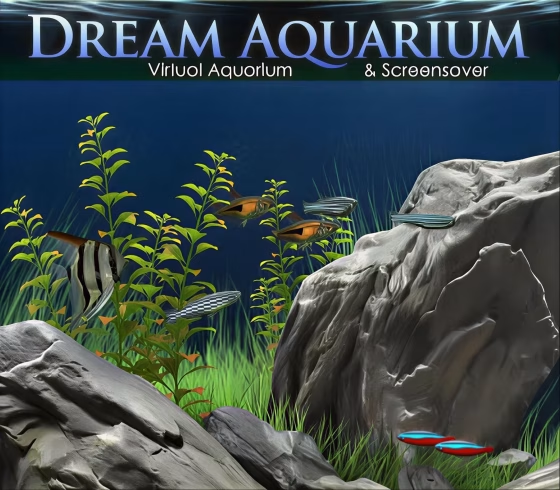
With Dream Aquarium 2026, users can explore many fish species and aquarium designs. This makes it perfect for both beginners and enthusiasts alike. The aquarium app makes its fish act like real fish. It gives you options to feed the fish yourself. It also has soft lighting around the tank. All of these help you relax more. Friends and family can enjoy watching your virtual fish tank on your desktop background, turning it into more than just a screensaver for your PC. Our software promises that 100% of its features work. It also comes with help to activate it. And it gives you a full activation setup, so you can use all of it. Need an alternative? Then check out Marine PC Aquarium Live Wallpaper Software.
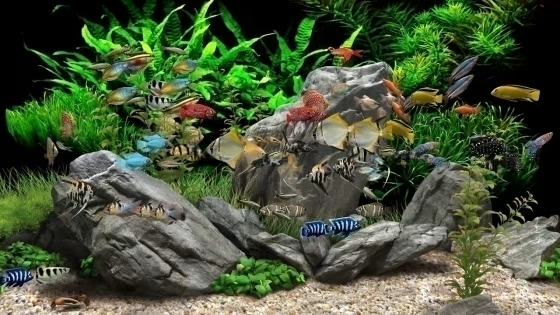
You can change a lot in your Dream Aquarium 2026 digital aquarium. It helps you to make your virtual fish tank your own. Its decoration tools help you add decorations and plants. They also help you pick from several tank layouts. This interactive aquarium application also is a meditation tool. This offers calming visuals and sounds that help reduce stress and boost focus, whether you’re working or gaming. You can download the full version for free via a direct link and enjoy the complete experience forever on your Windows PC, along with an offline installer and a standalone setup.
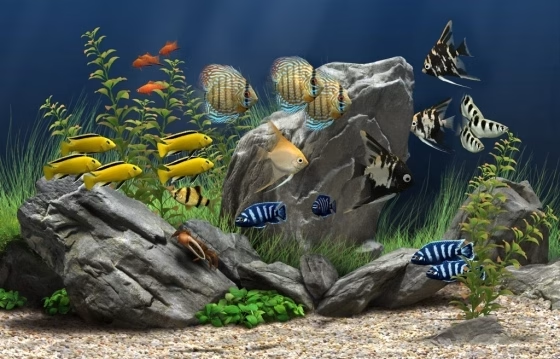
Dream Aquarium 2026 is the ultimate aquarium management game and desktop app. In it, you take care of your own fish tank. It puts fun, relaxing, and creative design in one package. Our 3D aquarium and realistic fish copy what real fish tanks are like. This gives all aquarium fans a smooth experience. Whether you’re looking for aquarium ambient software, aquarium wallpaper software, or a virtual fish tank for enjoyment, this desktop app has you covered. I recommend downloading this software now in its full version, using the direct link for easy installation. This makes sure you have working links, and enjoying the complete digital aquarium experience without limitations. If you would like, follow the link below to download it.
The Features:
- Realistic Fish Motion & Behavior: Extra animation makes fish swim and interact like real fish.
- Wide Variety of Fish Species: Includes over 27 different fish species for varied tank life.
- Articulated Fish Details: Fish fins, eyes, gills, and mouths animate individually.
- Virtual Fiddler Crab: Crab cleans the tank bottom and interacts with fish.
- Interactive Feeding System: Manual or automatic feeding of fish within the aquarium.
- Configurable Bubble Streams: Adjustable bubble effects for realism and mood.
- Shifting Light Rays: Dynamic lighting simulates realistic light penetration.
- Ground Ripples Effect: Natural water motion ripples across the tank.
- Gently Waving Plants: Animated plants that respond to water motion.
- Soft Real‑Time Shadows: Fish and objects cast smooth shadows.
- Background Customization: Variety of tank backgrounds to personalize scenes.
- Lighting Customization Options: Adjustable intensity and color schemes.
- High‑Definition Graphics: Detailed visuals and dynamic water effects.
- Ambient Sound & Music: Soothing water and bubble audio with optional background music.
- Multi‑Monitor Support: Extends aquarium display across multiple screens.
- Widescreen Formatting: Auto‑adjusts visuals for wide aspect ratios.
- Custom Fish Selection: Users choose which fish populate the tank.
- Background Import: Users can load their own images for backgrounds.
- Tank Decoration Variety: Plants and decor add a personal touch.
- Feeding Interaction Visuals: Watch fish respond to feeding actions.
- Performance & Display Options: Frame rate and energy usage controls in more versions.
- Screensaver Integration: Operates as a screensaver when the PC is idle.
- Multi-platform Support: Available for Windows and macOS screensaver modules.
- Commercial Licensing Availability: Optional license for public display use.
- Custom Fish Import: Ability to bring user‑created fish models or assets.
- Automatic Updates: Periodic online update checks for improvements.
Technical Setup Detail:
| Name | Dream Aquarium Screensaver |
|---|---|
| File Name | Dream_Aquarium_Screensaver_V2.0.exe |
| File Size | 18.3 MB |
| Version | 2.0 |
| License Type | Shareware / Trial |
| Released Date | 2025 (Latest update listed) |
| Created By | Spiralmonkey Software |
| Publisher | Spiralmonkey Software |
| Developer | Spiralmonkey Software |
| Category | Desktop Enhancements / Screensaver |
| Language | English |
| Uploaded By | Official Developer |
| Official Website | www.dreamaquarium.com |
| Compressed Type | EXE Installer |
| Compatibility | Windows XP, Vista, 7, 8, 10 and 11 |
System Requirements:
| Specification | System Requirements |
|---|---|
| OS | Windows XP, Vista, 7, 8, 10, and 11 |
| Processor | 1.8 GHz Dual-Core Processor or higher |
| RAM | 2 GB minimum |
| Graphics Card | OpenGL-compatible graphics card with 3D acceleration |
| DirectX | DirectX-compatible graphics support; OpenGL mode also available |
| Storage | 50 MB of free disk space |
| Input Device | Mouse and Keyboard |
| Permissions | Administrator permissions for installation |
| Display Resolution | 1024 × 768 or higher |
| Internet Connection | Required for downloading and activation |
| Mouse | Standard Windows-compatible mouse |
| Keyboard | Standard Windows-compatible keyboard |
How To Download And Install:
- First, click the download button below to go to the download page.
- On the download page, you can download it with the given method.
- After downloading, please read the instructions on the download page and follow them.
- After that, you’ll successfully install the software on your Windows.
- Now you have done it, and it’s ready to use.
If you like it and want to add a beautiful screensaver and wallpaper on your desktop, share it with your friends and family on Facebook, Twitter, and Google+, and then download the method below.




Leave a comment